
Writing Mosaic GPU kernels with Pallas#
This page is a reference for the most important features of the Pallas:MGPU backend. It’s not a tutorial and as such we do not expect everyone to read it top to bottom. Still, it is worth going over just to familiarise yourself with some patterns you can find in other tutorials.
In the following examples, we’re going to assume the following imports are in scope:
import jax.experimental.pallas as pl
import jax.experimental.pallas.mosaic_gpu as plgpu
What is a GPU?#
Technically, the NVIDIA GPU architecture looks as follows: the GPU is partitioned into streaming multiprocessors (SMs). The way this manifests in the CUDA programming model is that each CUDA thread block (or CTA) is scheduled on exactly one SM, but multiple blocks can be scheduled onto a single SM at a time.
Each SM contains a chunk of fast memory called shared memory (SMEM) and 4 subdivisions, each containing a warp scheduler and compute units (ALU, TensorCore, …). This is also reflected in the CUDA programs: each warp (a group of consecutive 32 CUDA threads in a block) is assigned to one of those subdivisions in a round-robin fashion. Similarly to blocks, each warp is assigned to exactly one subdivision (it never migrates), but multiple warps can be assigned to the same SM subdivision. At each clock cycle, the warp scheduler from each subdivision tries to select one of its resident warps to execute the next instruction.
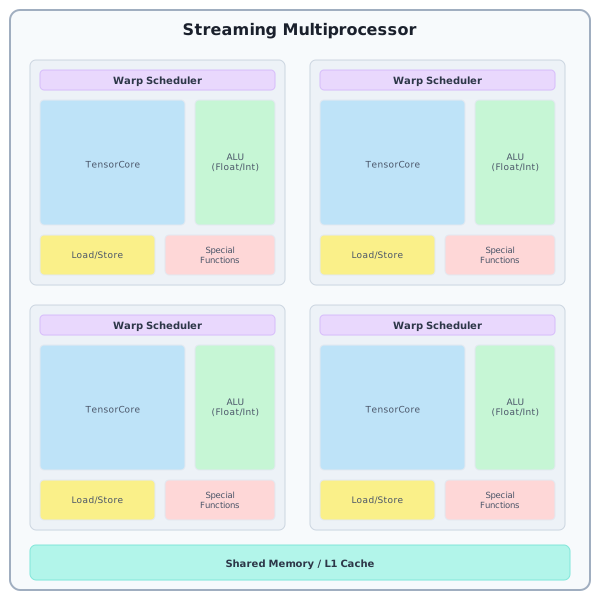
Going further, recent CUDA versions also outline the concept of a warpgroup, which are 4 consecutive warps. Knowing how the hardware looks like, we can see where this is coming from: 4 consecutive warps occupy the 4 quarters of an SM and let us issue instructions that utilize the whole SM.
Note
A GPU can be viewed in many different ways and in here we want to focus on a slightly simplified model that is very TensorCore-centric. This should help you navigate the complexities of writing kernels involving the TensorCore, but keep in mind that the real picture is more complicated.
For our purposes, TensorCore operations have grown so big that it no longer makes much
sense to follow the CUDA model. As such, to us, a GPU is a collection of single-threaded cores
(SMs) with one thread of Pallas:MGPU corresponding to a CUDA warpgroup. In this model, each
operation you perform in the kernel occupies the whole CUDA warpgroup, and its constituent
warps always run in lockstep (modulo the jitter from hardware scheduling) and never take
different paths through control flow (with the small exception of core_map that we will
discuss later). One notable addition here is that we still allow you to co-schedule multiple
of those Pallas-level threads on the same SM so that they can cooperate and communicate
through shared memory (we realize that by putting them in the same CUDA block).
Note
From now on, whenever we say “thread”, we refer to the Pallas thread, not a CUDA thread/lane.
Note
This is very similar to a programming model popularized by Triton, but as you will see there are a few differences. Mosaic GPU tends to be more low level, which usually means you will have to put in more work, but it also puts you more in control. In our view both approaches have their merits and we encourage you to pick the backend that suits your needs the best! Pallas supports and will continue to support Triton as an alternative GPU backend.
In-order execution & using multiple hardware units#
Unlike more complicated CPU architectures GPU only support in-order execution. That, however, does not mean that at any given time only a single instruction is running! Each SM quarter has multiple independent functional units: TensorCore, Arithmetic logic unit (ALU), Load/Store (LSU), Special function unit (SFU). If the first instruction targets one of the units and is followed by another one (that does not use the result of the first one), then the warp scheduler can issue the second one before the first one completes. This is often referred to as instruction-level parallelism (ILP) and is a common theme in modern TensorCore kernels: TensorCore operations are so big and take so many cycles to complete, that it is a waste to not try to use other units in the meantime.
To extend this even further, we can take advantage of this hardware-unit-level parallelism by allowing multiple Pallas threads to run concurrently. If one of the threads primarily occupies the ALU, while another one primarily issues TensorCore related instructions, we can take advantage of the efficient context switching built into the warp schedulers to keep both units busy. This is one of the core idea behind algorithms such as FlashAttention 3 or CUTLASS ping-pong matmul kernels.
For more information on how warp scheduling and instruction issue works, we recommend reading Analyzing Modern NVIDIA GPU cores.
Memory spaces#
The GPU features a few different memory spaces that can be totally ordered from largest (in terms of capacity) and slowest (in both total bandwidth and latency of a single access).
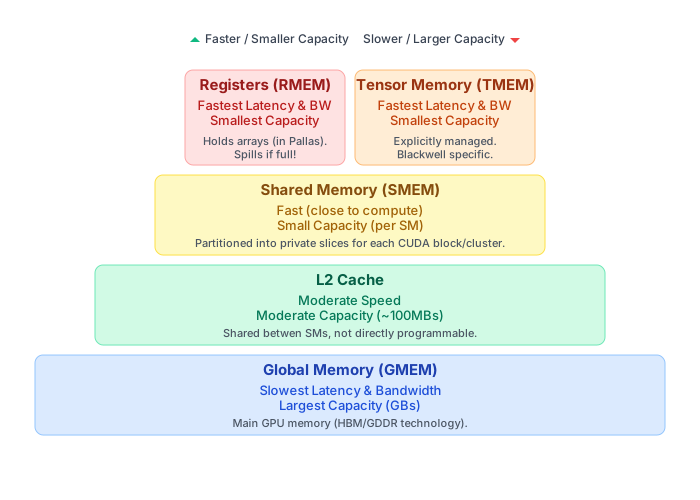
The biggest memory space is plgpu.GMEM, for global memory. In recent data-center grade GPUs
this memory space is often measured in tens or even hudreds of gigabytes, but it is also the
slowest one.
The next memory space, used for the L2 cache, is also more or less global in the sense that it is shared by the whole GPU, but its use can only be influenced indirectly through cache hints. As such, there’s no way to manually place values in there and so this memory space is not exposed in Pallas:MGPU. While only about a 100MB in size, this memory has considerably higher bandwidth than GMEM, and so it is still often recommended to take advantage of it while writing high-performance kernels.
Next in line is shared memory, or plgpu.SMEM. This memory is located directly inside each SM
and so it is partitioned. Unless block clusters are used (see the section of clusters below),
each block is only allowed to access its own SMEM allocations.
Finally, the lowest level memory space is the register memory. This is where every single value
(i.e. JAX array) in a Pallas kernel will be located. If the compiler runs out of registers to
store those arrays, it will insert spills, meaning that it will periodically store and reload
values to memory. Those spills often introduce other significant performance degradations and so
we recommend avoiding them. The warning messages about spills can be clearly seen in the ptxas
messages during kernel compilation. To make them visible, run with MOSAIC_GPU_DUMP_PTXAS=1
in your environment.
The Blackwell GPU generation, has one additional memory space called tensor memory or plgpu.TMEM.
TMEM is very similar to register memory, only it is explicitly allocated and managed by you.
It is used to store the MMA accumulator, operand metadata (for sparsity or scaling),
and optionally the left MMA operand. See the Blackwell MMA section for more information about TMEM.
Requesting/allocating memory in specific memory spaces#
Kernel inputs or outputs are placed in SMEM by default. If you want to access them as GMEM references
add memory_space=plgpu.GMEM to their BlockSpec. If you want the kernel to be called with the whole
input or output array in GMEM, it is sufficient to specify BlockSpec(memory_space=plgpu.GMEM).
SMEM and TMEM can be allocated explicitly in the scratch_shapes argument of pl.pallas_call,
or using pl.run_scoped. To allocate a reference, simply call the memory space object with the
requested shape and dtype. For example: plgpu.SMEM((128, 128), jnp.float16) will allocate a 128x128
array of float16 elements in shared memory.
Taking advantage of the L2 cache#
While the L2 cache cannot be managed manually, its noticeably higher bandwidth compared to global memory makes it worth thinking about. The simplest way to take advantage of it, is to reorder the parallel grid dimensions so that invocations that are scheduled in similar time periods also access the same input data.
While the CUDA programming model does not guarantee anything about the order in which the blocks
are assigned to SMs, in recent generations the heuristic seems to simply iterate over the
(x, y, z) CUDA grids in column-major order (i.e. x is the fastest-changing dimension and
z is the slowest). Similarly, Pallas:MGPU does not guarantee how a user-specified grid is mapped to
the CUDA grid (Pallas supports grids of arbitrary rank, not just up to 3D). However, you can assume that
the iteration will happen in row-major order. That is, if a grid has dimensions (a, b), then
b will be the fastest-changing dimension and a will be the slower one.
To give a practical example of this, consider a plain matrix multiplication kernel. There, one
usually uses two parallel grid dimensions (m, n), corresponding to tiling the two non-contracting
dimensions. If we use this simple scheme, in Pallas:MGPU all programs with id (0, ...) will be
scheduled before any block with id (1, ...). And, collectively, the programs with m=0 have to
read all of the B operand! If the n or k dimensions are very large, there is no chance that
we’ll be able to get cache hits from the (1, ...) programs from accesses made by the (0, ...)
programs. For simplicity, assuming we can only run 16 blocks at a time, we see this access pattern
from the first scheduled wave:
However, if we simply rearrange the grid to be (m // mt, n, mt) (and then replace pl.program_id(0)
with pl.program_id(0) * mt + pl.program_id(2) in the kernel), it is straightforward to see that a
band of programs along both dimensions will be scheduled concurrently (instead of scheduling a single
row). This greatly increases the number of concurrent programs that load similar slices of data,
usually significantly improves the L2 utilization and hence the overall performance of the kernel
(if it was memory bound). Continuing our example with 16 blocks and using mt=4, we get the following
access pattern:
Note that even though the number of active blocks hasn’t changed, the total footprint of the data they access has halved! We get a much higher chance of getting L2 hits now.
Array layouts and memory reference transforms#
In Pallas, the data structures you work with (arrays and references) have a logical shape (e.g., a 128x128 matrix). This logical shape must be mapped to a physical representation (how the data is actually represented in the GPU’s memory). The specific mapping depends on where the data resides:
Array Layouts: Arrays are stored in register memory and we call this mapping a layout. Layouts define how the elements of an array are distributed across the registers available to the CUDA lanes that form a Pallas thread.
Memory Reference Transforms: For mutable references pointing to
SMEM, this mapping is called a transform. Transforms describe how the logical data structure is arranged within that block of memory.
These concepts are crucial for performance, especially when interacting with specialized hardware units like TensorCores or optimizing memory access patterns.
Note
We are working on a mode that will deal with assigning layouts and transforms fully automatically (although with way to provide hints and more control). The APIs listed below will likely continue to function, but will become optional.
Memory reference transforms#
Transforms are applied when a memory reference is first allocated. Pallas primitives that operate on these references will automatically account for their associated transforms.
def body(..., scratch_ref):
  # Asynchronous copy will reformat the GMEM data to match the SMEM transforms
  plgpu.copy_gmem_to_smem(..., scratch_ref, barrier)
  plgpu.barrier_wait(barrier)
  plgpu.wgmma(..., scratch_ref)  # wgmma only accepts properly transformed refs
  ...
There are two ways in which references are allocated and each has a way to select the desired transforms:
1. Using plgpu.BlockSpec
transforms = (plgpu.TileTransform((8, 64)), plgpu.SwizzleTransform(128))
f = pl.pallas_call(
  in_specs=plgpu.BlockSpec(in_block_shape, in_index_map, transforms=transforms),
  out_specs=plgpu.BlockSpec(out_block_shape, out_index_map, transforms=transforms),
  ...
)
Note that unlike plgpu.BlockSpec, pl.BlockSpec does not allow specifying
transforms.
2. Specifying the transforms argument on the allocated SMEM
transforms = (plgpu.TileTransform((8, 64)), plgpu.SwizzleTransform(128))
f = pl.pallas_call(
  scratch_shapes=plgpu.SMEM((128, 128), jnp.float16, transforms=transforms),
  ...
)
The available transforms are:
plgpu.TileTransform(tile_shape), which organizes the data into contiguous, non-overlapping tiles of shapetile_shape. The data of one tile is always fully linearized (row-major), before another tile begins (tiles are also traversed in row-major order). As an example, applyingTileTransform((8, 64))to a(128, 128)reference means the data corresponding to the logical slice[0:8, 0:64]will be stored first (row-major), followed by[0:8, 64:128], [8:16, 0:64], [8:16, 64:128], and so on. A different way to achieve this would be to take the input arrayxand traversex.reshape(128 // 8, 128 // 64, 8, 64).transpose(0, 2, 1, 3)in row-major order.plgpu.SwizzleTransform(swizzle_in_bytes), which transforms the data as described in the PTX docs and CUDA docs. Swizzling is useful, because it allows transferring data in MMA-related layouts between register and shared memory without bank conflicts. The exact details of how the memory looks like after swizzling are not that important, since all primitives will account for it automatically. Note that the swizzle amount is specified in bytes (only 128, 64, 32 and 16 are supported), and is usually accompanied by aTileTransform(which uses elements in its shape!).plgpu.TransposeTransform(permutation), which permutes the dimensions of the array before it is linearized. This is primarily useful in that it lets you change the layout during the GMEM-SMEM copies (only do keep in mind that changing the minormost/last dimension is not supported by the hardware).
Note
When performing GMEM-SMEM or SMEM-GMEM copies and a plgpu.TileTransform is
applied on the SMEM reference, the offsets into the GMEM reference must be
aligned with the tile sizes. If that is not the case, the transfer may produce
wrong results.
Array layouts#
There are a few useful layouts we have defined for you so far:
plgpu.Layout.WGMMA, which is the layout in which the Hopper-generation TensorCore expects the MMA accumulator or 16-bit input operands to have in registers. Callingplgpu.Layout.WGMMA.reduce(axes)gives a layout suitable for values reduced along the specified axes, e.g.reduce(1)for a row result andreduce(0)for a column result. Re-broadcasting the reduced dimensions is free and produces a value withWGMMAlayout.plgpu.Layout.WG_STRIDED, where the value is partitioned equally among the 128 CUDA lanes making up a Pallas thread. The consecutive elements (after vectorization) are assigned to the lanes in a round-robin fashion. Very simple and effective when no interaction with TensorCores is needed.plgpu.Layout.WG_SPLAT, indicating that the value is constant. Each CUDA lane will hold a single register that contains the value. You normally never have to interact with this layout, as it is implicitly used when constant values are created and is always implicitly convertible to other layouts.
At the moment, in the default mode of operation, array layout propagation happens only in a forward direction and there is little implicit support for reconciling layout conflicts: only splat layouts can be implicitly converted into any other layout. If you e.g. try to add two arrays that have a different layout, the lowering will complain and fail. There are very limited facilities that let you convert between layouts, and we usually recommend storing the value to SMEM and reading it back in the target layout.
MMA (TensorCore)#
In this section, we focus on how Pallas:MGPU kernels can utilize the TensorCore unit. The programming interface of the TensorCore changes significantly between different NVIDIA GPU generations, which is why the lowest-level interfaces differ in Pallas:MGPU as well.
Each MMA operation is associated with three operands:
the accumulator
Dof shape(M, N),the left input
Aof shape(M, K),the right input
Bof shape(K, N). All operands must have the same element type.
Each use of MMA involves a few steps:
Allocating the space for the accumulator (MMA implicitly performs
D += A @ B)Preparing the
AandBoperandsIssuing the operation
Waiting for the operation to complete
Reading out the result
Steps 2.-4. are usually performed in a loop over the contraction dimension (K).
Memory space of A and B operands#
The A and B operands are generally best passed in through SMEM, where they can
be conveniently loaded using plgpu.copy_gmem_to_smem. For those operands to be
compatible with MMA operations, they need to have the appropriate tiling and swizzling
transforms specified upon their allocation. For all currently supported generations,
the TensorCore requires the data to be laid out into row-major 2D tiles of shape
(8, swizzle_elems), where swizzle_elems is derived by dividing the swizzle by the
element type bytewidth. The currently supported swizzles are: 128, 64, and 32. Larger
swizzles are preferable as they improve the performance of GMEM-to-SMEM copies.
def mma_transforms(shape_dtype: jax.ShapeDtypeStruct):
  assert len(shape_dtype.shape) == 2
  if shape_dtype.shape[0] % 8:
    raise ValueError("Number of rows must be divisible by 8")
  for swizzle_bytes in (128, 64, 32):
    swizzle_elems = swizzle_bytes // shape_dtype.dtype.itemsize
    if shape_dtype.shape[-1] % swizzle_elems == 0:
      return (plgpu.TilingTransform((8, swizzle_elems)),
              plgpu.SwizzleTransform(swizzle_bytes))
  raise ValueError("Failed to find transforms for the specified window type")
If the operands need to be transformed, the A operand can be passed in through a different
memory space (architecture dependent, see below). The B operand must be located in SMEM.
Transposed operands#
When performing MMA on 16-bit operands, the TensorCore can automatically transpose the
input data. For example, the A reference is allowed to be of shape (K, M), but it
has to be transposed before passing it into the mma function. For example:
assert acc_ref.shape == (M, N) and a_ref.shape == (K, M) and b_ref.shape == (K, N)
a_ref_t = plgpu.transpose_ref(a_ref, (1, 0))
assert a_ref_t.shape == (M, K)  # The shape expected by plgpu.wgmma
plgpu.wgmma(acc, a_ref_t, b_ref)
An analogous operation is allowed on the B reference in this case too.
Hopper (wgmma)#
In this section, we cover the basics of using the Hopper-generation TensorCores, exposed in
PTX as the wgmma.mma_async instruction.
Allocating the accumulator#
In the Hopper hardware architecture the accumulator is allocated in registers, but in Pallas it is modeled as a mutable reference, as each MMA operation accumulates in-place. There are two ways to allocate the accumulator.
To create a zero-initialized accumulator you can use pl.run_scoped with a
plgpu.ACC((m, n), dtype) type.
def compute(acc_ref):
  ...
  return acc_ref[...]
output = pl.run_scoped(compute, plgpu.ACC((m, n), jnp.float32))
Dereferencing the accumulator reference, as seen in the end of the compute function will
implicitly await all outstanding WGMMA operations.
If you’d like to initialize it with an existing array, you can use pl.run_state with
plgpu.ACC.init(init_array):
def compute(acc_ref):
  ...
  return # pl.run_state only returns the final value of the accumulator
output = pl.run_state(compute)(plgpu.ACC.init(init_array))
If pl.run_state has accumulator operands, it implicitly awaits all outstanding WGMMA
operations before returning the final values.
Preparing the A and B operands#
As discussed above, we recommend passing in A and B through shared memory. In this
case the correct tiling and swizzling transforms must be specified.
plgpu.wgmma additionally allows passing in A through registers (i.e. not an SMEM
reference but as a regular JAX array). This mode, however, comes with a number of
significant drawbacks and it is very difficult to ensure sufficient synchronization to
make this safe.
TODO: Explain the conditions under which it is acceptable to do this.
Issuing the operation#
The supported MMA shapes are such that:
Mis divisible by 64Nis divisible by 8 and not greater than 256Kis a multiple ofswizzledivided by the operand’s element type bytewidth
The currently supported data types are: jnp.float32, jnp.bfloat16 and jnp.float16.
The accumulator D must be a jnp.float32, with the exception of jnp.float16 inputs,
in which case it is allowed to be jnp.float16 as well.
Waiting for the operation to complete#
Each plgpu.wgmma call implicitly synchronizes with all previous plgpu.wgmma calls, such
that once control returns from it, we guarantee that no WGMMA other than the last issued
one is still running. As such, any SMEM regions that were read by previously issued WGMMA
instructions can be reused. This is especially relevant for pipelining WGMMA with async memory copies:
buffers = 3  # In reality you might want even more
assert a_smem.shape == (buffers, m, k)
assert b_smem.shape == (buffers, k, n)
assert acc_ref.shape == (m, n)

def fetch_a_b(ki, slot):
  a_slice = ... # Replace with the right M/K slice
  b_slice = ... # Replace with the right K/N slice
  plgpu.copy_gmem_to_smem(a_gmem.at[a_slice], a_smem.at[slot], a_loaded.at[slot])
  plgpu.copy_gmem_to_smem(b_gmem.at[b_slice], b_smem.at[slot], b_loaded.at[slot])

def loop_body(i, _):
  slot = jax.lax.rem(i, buffers)
  plgpu.barrier_wait(a_loaded.at[slot])
  plgpu.barrier_wait(b_loaded.at[slot])
  plgpu.wgmma(acc_ref, a_smem.at[slot], b_smem.at[slot])
  # We know that only the last issued WGMMA is running, so we can issue a async load in
  # into the other buffer
  load_i = i + buffers - 1
  load_slot = jax.lax.rem(load_i, buffers)
  @pl.when(jnp.logical_and(load_i >= buffers, load_i < num_steps))
  def _do_fetch():
    fetch_a_b(load_i, slot)
for slot in range(buffers):
  fetch_a_b(slot, slot)
jax.lax.fori_loop(0, num_steps, loop_body, None)
Blackwell (tcgen05)#
The Blackwell generation has significantly redesigned the TensorCore subunit. It is now significantly more independent from the regular warp schedulers and no longer uses or even supports using registers as its operands. In their place, a new memory space called tensor memory (TMEM) has been introduced. What’s more TensorCores from pairs of SMs can now pool their resources and compute larger MMA operations that span both SMs. We call this a “collective MMA operation”.
Allocating the accumulator / Using TMEM#
TMEM references can be allocated in the same way in which all other references
are allocated—using pl.run_scoped:
@functools.partial(pl.run_scoped, tmem_ref=plgpu.TMEM((128, 128), jnp.float32))
def barrier_scope(tmem_ref):
  ...
Not all shapes can be allocated in TMEM. Only 2D references are supported, and the number of rows (the size of the first dimension) must be 128 or 64 at the moment.
What’s more, if the data type has a bitwidth smaller than 32-bits, it is necessary to declare if the allocation is supposed to be packed (e.g. putting two 16-bit elements into a single 32-bit cell in TMEM) or not (with each element padded up to 32-bits). MMA accumulators (fp32 or fp16) are never packed, but if the left operand it passed in TMEM, it must always be packed:
@functools.partial(pl.run_scoped,
                   acc_ref=plgpu.TMEM((128, 128), jnp.float16, packed=False),
                   lhs_ref=plgpu.TMEM((128, 128), jnp.float16, packed=True))
def barrier_scope(acc_ref, lhs_ref):
  plgpu.tcgen05_mma(acc_ref, lhs_ref, rhs_smem_ref, ...)
  ...
Another interesting complication with TMEM is that all operations on it are asynchronous. For that reason, reads and writes using the Python subscript syntax that are normally used e.g. for SMEM are not allowed for TMEM.
Loads#
Loads can be performed using plgpu.async_load_tmem and awaited using plgpu.wait_load_tmem:
smem_ref[...] = plgpu.async_load_tmem(tmem_ref)
plgpu.commit_smem()
plgpu.copy_smem_to_gmem(smem_ref, gmem_ref)
plgpu.wait_smem_to_gmem(0)
plgpu.wait_load_tmem()  # Wait for the read to fully complete before we overwrite tmem_ref again.
The load semantics are quite confusing, in that the array returned from the load
can be safely used without any additional synchronization. However, if the read
TMEM region is ever overwritten again (e.g. by a store or an MMA operation), the
thread that issued the load must first call plgpu.wait_load_tmem() to ensure
the program remains race-free.
Note
One way to make peace with this seemingly causality-breaking behavior (data arrives in registers before it is fully read from TMEM) is to consider that it might be an effect of an interaction of a limitation and a convenience feature in the PTX compiler. We don’t know if this is true, but at least it makes sense.
The convenience feature is that the compiler can reliably track the usage of registers produced by TMEM loads and will insert the minimum number of delays necessary to ensure the data arrives from TMEM before it’s used. The read operation is unrolled into many instructions, meaning that they don’t have to all be awaited before we start consuming the registers filled in by the first load. This is why we don’t need to guard the use of the result.
The limitation is that the compiler cannot reliably perform alias analysis on TMEM loads and stores, which is why any load and store that is not separated by an explicit wait is considered safe to execute concurrently. The alternative would unnecessarily pessimize the performance of loads and stores that are truly unrelated. This is why we need to explicitly wait before we reuse TMEM again.
Stores#
Conversely, stores are performed using plgpu.async_store_tmem and awaited using plgpu.commit_tmem:
plgpu.async_store_tmem(tmem_ref, smem_ref[...])
plgpu.commit_tmem()
smem_ref2[...] = plgpu.async_load_tmem(tmem_ref)  # Safe to read from tmem_ref now
Preparing the A and B operands#
We recommend passing in A and B through shared memory. In this case the
correct tiling and swizzling transforms must be specified.
The A operand can be passed in as a TMEM reference as well, but it must be packed.
Issuing the operation#
The supported non-collective MMA shapes are such that:
Mis 64 or 128Nis divisible by 8 and not greater than 512Kis a multiple of8 * swizzledivided by the bitwidth of element type
The supported collective MMA shapes are such that:
Mis 128 or 256 (half of that per block)Nis divisible by 8 and not greater than 256 (not greater than 128 in each block)Kis a multiple of8 * swizzledivided by the bitwidth of element type
The currently supported floating-point data types are: jnp.bfloat16,
jnp.float16, jnp.float8_e5m2, jnp.float8_e4m3fn. The accumulator can be
a jnp.float32 or jnp.float16, with the exception of jnp.bfloat16 when it
must be a jnp.float32.
The only currently supported integer data type is jnp.int8 with a jnp.int32
accumulator.
Note
According to our benchmarks, here are some performance rules-of-thumb:
Non-collective MMA should always use M=128 and N >= 128.
M=64 causes a significant performance drop.
N=64 causes a noticeable performance drop, but not as significant as M=64.
Collective MMA is always reasonably fast, but not faster than non-collective MMA.
The biggest benefit from collective MMA is not higher TensorCore throughput but the ability to share data between SMs, allowing to increase the arithmetic intensity of the kernel.
Swizzle and transposes do not seem to affect performance in a significant way.
Waiting for the operation to complete#
Awaiting the result of a plgpu.tcgen05_mma
call requires the use of a Barrier. We recommend reading through the reference
documentation for Barriers, and especially its
Blackwell-related subsection for more information.
If the barrier is passed in directly to
the plgpu.tcgen05_mma,
completing a wait on that barrier will indicate that the final accumulator has
been written to TMEM. For example:
@functools.partial(pl.run_scoped, barrier_ref=plgpu.Barrier(orders_tensor_core=True))
def barrier_scope(barrier_ref):
  plgpu.tcgen05_mma(acc_tmem, lhs_ref, rhs_ref, barrier_ref, accumulate=False)
  plgpu.barrier_wait(barrier_ref)
  # We can read the result now.
  result = plgpu.async_load_tmem(acc_tmem)
  ...
If no barrier is given to plgpu.tcgen05_mma,
its completion will be tracked only once plgpu.tcgen05_commit is called:
@functools.partial(pl.run_scoped, barrier_ref=plgpu.Barrier(orders_tensor_core=True))
def barrier_scope(barrier_ref):
  plgpu.tcgen05_mma(acc_tmem, lhs_ref, rhs_ref, accumulate=False)
  plgpu.tcgen05_mma(acc_tmem, lhs_ref2, rhs_ref2)
  plgpu.tcgen05_commit(barrier_ref)
  plgpu.barrier_wait(barrier_ref)
  # We can read the result now. Both MMAs have completed.
  result = plgpu.async_load_tmem(acc_tmem)
  ...
Collective MMA#
The Blackwell generation gains a new way to perform MMA operations, where the
TensorCores of 2 SMs in a cluster collaborate on a single MMA operation. The
B operand from each SM is shared with the other. The D and A operands are
local to each SM and not shared.
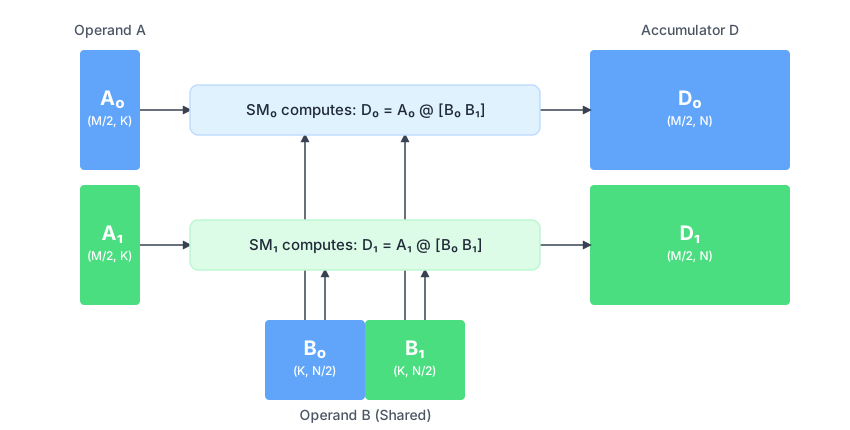
This means that to perform a collective MMA with shape M, N, and K, the operands
in each of the two Pallas threads should be of sizes: (M // 2, K) for A,
(K, N // 2) for B and (M // 2, N) for D (the accumulator). Stacking the
two accumulators on top would recover the result of performing a MxNxK matrix
multiplication.
To make loading of the B operand easier, plgpu.copy_gmem_to_smem
can be used together with collective_axes and leader_tracked=plgpu.CopyPartition.PARTITIONED(axis) to indicate
that the two Pallas threads along the collective axis should load the same slice,
but each will only obtain half of it. Unlike a copy with collective_axes alone
it does not utilize TMA multicast (since each thread loads a distinct slice of
data), but it can simplify the indexing logic a bit.
plgpu.copy_gmem_to_smem(
    b_gmem,  # [K, N]
    b_smem,  # [K, N // 2]
    b_tma_barrier,
    collective_axes="x",
    leader_tracked=plgpu.CopyPartition.PARTITIONED(1),
)
Using core_map#
pl.pallas_call is suitable for kernels where a single Pallas thread can
perform the whole computation for an entire CUDA block. The pl.core_map
function relaxes this restriction, allowing for using multiple threads within a
single block (e.g. for warp specialization) or across multiple blocks in a block
cluster (e.g. to utilize multicast TMA).
Replacing pl.pallas_call with pl.core_map or plgpu.kernel#
Let us begin with a simple Pallas kernel that increments an array:
@functools.partial(
  pl.pallas_call,
  grid=(2,),
  in_specs=[pl.BlockSpec(block_shape=(128,), index_map=lambda i: (i,))],
  out_specs=pl.BlockSpec(block_shape=(128,), index_map=lambda i: (i,)),
  out_shape=jax.ShapeDtypeStruct((256,), jnp.float32), # Total output shape
)
def run_kernel(x_ref, y_ref):
  # x_ref and y_ref are in SMEM!
  y_ref[...] = x_ref[...] + 1

x = jnp.arange(256, dtype=jnp.float32)
y = run_kernel(x)
np.testing.assert_array_equal(y, x + 1)
We can write a similar kernel using pl.core_map. One big difference is that
unlike pl.pallas_call, no GMEM<->SMEM copies will be inserted automatically.
If you want them, you can either insert them yourself or use the
plgpu.emit_pipeline
helper. We recommend reviewing the software pipelining guide.
@pl.run_state
def run_kernel(refs):
  x_ref, y_ref = refs
  # Here, we're not in the kernel yet! pl.run_state simply changes the JAX
  # immutable arrays into mutable GMEM (not SMEM!) references.

  # Define the mesh: 2 CUDA blocks over 1 axis called "x"
  mesh = plgpu.Mesh(grid=(2,), grid_names=("x",))

  @pl.core_map(mesh)  # core_map executes the body
  def kernel_body():
    # Once we enter the pl.core_map scope, we are in the body of the kernel.
    block_slice = pl.ds(jax.lax.axis_index("x") * 128, 128)
    y_ref[block_slice] = x_ref[block_slice] + 1

x = jnp.arange(256, dtype=jnp.float32)
y_init = jnp.zeros_like(x)
_, y = run_kernel((x, y_init))
np.testing.assert_array_equal(y, x + 1)
While pl.core_map is a powerful API, it is also quite low-level and is pretty
much always used in under pl.run_state (to make JAX arrays into refs) or
pl.run_scoped (to allocate for scratch refs). For that reason, we also
provide a convenience API plgpu.kernel:
@functools.partial(
    plgpu.kernel,
    out_shape=jax.ShapeDtypeStruct((256,), jnp.float32),
    grid=(2,),
    grid_names=("x",),
)
def run_kernel(x_ref, y_ref):
  # x_ref and y_ref are in GMEM!
  block_slice = pl.ds(jax.lax.axis_index("x") * 128, 128)
  y_ref[block_slice] = x_ref[block_slice] + 1

x = jnp.arange(256, dtype=jnp.float32)
y = run_kernel(x)  # No need to preallocate outputs as in pl.core_map.
np.testing.assert_array_equal(y, x + 1)
Note
The plgpu.Mesh used with pl.core_map defines a topology for computation
within a single GPU, specifying how work is distributed across CUDA blocks
(the grid), Pallas threads within a block (num_threads), and potentially
CUDA block clusters (cluster). This is analogous to how jax.sharding.Mesh
defines a topology for distributed computation across multiple devices in JAX.
Both involve SPMD programs executing across the defined topology. Furthermore,
you can run “collectives” over the Pallas threads and cluster (e.g., using
plgpu.ClusterBarrier or collective async copies), similar to how JAX
collectives (psum, all_gather, etc.) operate across devices in a JAX Mesh.
Both also use named axes, and jax.lax.axis_index(axis_name) can be used to get
a thread’s or block’s coordinate.
Using multiple Pallas threads per CUDA block#
Below, you can find an example of two Pallas threads within a single block synchronizing through a barrier and even exchanging data through SMEM.
x = jnp.arange(128, dtype=jnp.float32)

@functools.partial(
    plgpu.kernel,
    out_shape=x,
    scratch_shapes=dict(
        smem_ref=plgpu.SMEM(x.shape, x.dtype),
        barrier_ref=plgpu.Barrier(),
    ),
    num_threads=2,
    thread_name="pallas_thread",
)
def run_kernel(x_ref, y_ref, smem_ref, barrier_ref):
  thread_id = jax.lax.axis_index("pallas_thread")

  @pl.when(thread_id == 0)
  def producer_thread():
    smem_ref[...] = x_ref[...] + 1
    plgpu.barrier_arrive(barrier_ref)  # Signal the consumer thread

  @pl.when(thread_id == 1)
  def consumer_thread():
    plgpu.barrier_wait(barrier_ref)  # Wait for the producer thread
    out_ref[...] = smem_ref[...] + 1

y = run_kernel(x)  # There's no need to preallocate the input anymore.
np.testing.assert_array_equal(y, x + 2)
While this example is simple, you can find a more complicated example in the synchronization section.
Multiple threads are frequently used in high-performance kernels such as the latest flash attention variants or ping-pong matrix multiplication. In both of those, there are 2 compute threads in the program that use the SM’s ALU and TensorCore in an alternating fashion to ensure no execution conflicts.
Another common technique is to allocate one Pallas thread and devote it entirely
to scheduling asynchronous copies for data consumed by other threads. While
implementing this scheme from scratch can be complicated, we provide a
convenient helper API: plgpu.emit_pipeline_warp_specialized.
Using CUDA block clusters#
The kernel below launches a single cluster of 2 CUDA blocks and uses the TMA multicast feature to collectively perform a copy of GMEM into SMEM of both blocks. All blocks participating in the collective copy must schedule the exact same copy for the program to be valid.
@functools.partial(
    plgpu.kernel,
    out_shape=jax.ShapeDtypeStruct((2, 128), jnp.float32),
    scratch_shapes=dict(
        smem_ref=plgpu.SMEM((128,), jnp.float32),
        barrier_ref=plgpu.Barrier(),
    ),
    cluster=(2,),
    cluster_names=("cluster",),
)
def run_kernel(x_ref, y_ref, smem_ref, barrier_ref):
  # Specifying collective_axes will enable TMA multicast automatically.
  plgpu.copy_gmem_to_smem(x_ref, smem_ref, barrier_ref, collective_axes="cluster")
  plgpu.barrier_wait(barrier_ref)
  plgpu.copy_smem_to_gmem(smem_ref, o_ref.at[jax.lax.axis_index("cluster")])
  plgpu.wait_smem_to_gmem(0)

x = jnp.arange(128, dtype=jnp.float32)
y = run_kernel(x)
# Each block gets the same data and writes it out.
np.testing.assert_array_equal(y, jnp.stack([x, x], axis=0))
Collective allocations in pl.run_scoped#
When using pl.core_map with multiple Pallas threads (i.e., num_threads > 1
in plgpu.Mesh), allocations made via pl.run_scoped (for SMEM or Barriers)
must be performed collectively by all threads. This is indicated by specifying
a collective_axis argument to the run_scoped, which has two effects:
it promises that all threads will call the same allocation, and
all threads will receive the exact same allocation.
If collective_axes is not specified or does not include the Pallas thread axis, each thread would get its own private copy of the scratch variable. This is usually undesired and not supported at the moment.
Global (grid-wide) allocations using pl.get_global#
Sometimes, it is useful to allocate semaphores in a way that enables them to be
shared by all the parallel program instances. For example, when the number of
parallel instances is small enough that the kernel is persistent. Such allocations
are possible using pl.get_global:
def body(out_ref):
  sem_ref = pl.get_global(plgpu.SemaphoreType.REGULAR)
  block_id = lax.axis_index("x")
  @pl.when(block_id == 0)
  def _():
    pl.semaphore_signal(sem_ref)  # Block 0 signals
  @pl.when(block_id == 1)
  def _():
    pl.semaphore_wait(sem_ref)  # Block 1 waits
    out_ref[...] = jnp.ones_like(out_ref)

out_shape = jax.ShapeDtypeStruct((128,), jnp.float32)
plgpu.kernel(body, out_shape=out_shape, grid=(2,), grid_names=("x",))()
Synchronization structures and primitives#
In this section, we go over the most important functions and data structures used for synchronization between threads and also some asynchronous operations.
commit_smem#
Regular reads/writes to references are guaranteed to produce values consistent
with the sequential program order. For example, in the following program, it is
guaranteed that value is equal to value2.
ref[...] = value
value2 = ref[...]
This guarantee, however, does not extend to asynchronous primitives such as async
copies or MMA operations. To make the SMEM writes visible to those primitives, you
are required to explicitly synchronize with them using the plgpu.commit_smem() function.
For example:
smem_ref[...] = value
plgpu.commit_smem()
plgpu.copy_smem_to_gmem(smem_ref, ...)
or:
smem_ref[...] = value
plgpu.commit_smem()
plgpu.wgmma(smem_ref, ...)
This explicit synchronization is also required in the other direction, for example:
v = plgpu.load(smem_ref, ())
plgpu.commit_smem()
plgpu.copy_gmem_to_smem(..., smem_ref, ...)
Failing to call this function is likely to cause subtle data races, due to those asynchronous hardware units reading stale data from SMEM. Unfortunately, this function is relatively expensive, which is why we rely on you, the user, to insert it in the minimal number of places where it’s necessary.
Barrier#
This is essentially a thin wrapper around an array of PTX mbarrier types and is
passed in as a reference. All functions involving barriers expect to only get a single
barrier argument, and so if the reference contains multiple, you have to extract one
of them explicitly using barriers.at[index]. Barriers are always allocated in SMEM
and as such have relatively low overheads. Each barrier can be configured to complete
after a fixed number of “arrivals” (by default 1).
To block a thread until a barrier completes, use the following function:
plgpu.barrier_wait(barrier)
Warning
It is critical to ensure that the synchronization scheme makes it impossible for two
barrier completions to happen without a call to plgpu.barrier_wait in between them.
For example, if you use Barriers to synchronize two producer/consumer threads, you
need to perform barrier synchronization going both ways to introduce “backpressure”
that will stop one thread from arriving twice before the other one had a chance to await.
Failing to satisfy this will corrupt the data structure and can cause surprising failures
(including CUDA runtime errors). See below for an example of a valid program with two threads.
Warning
Another critical restriction is that the number of barrier completions must equal the number of barrier waits throughout the barrier’s lifetime. It is not allowed to end a scoped allocation of a barrier when it has an unawaited completion. Otherwise, when it is reused by the compiler, leaving it in this state can cause problems downstream.
Warning
Finally, it is crucial to ensure that each thread that ever waits on a Barrier
takes part in all wait operations on it. It is not allowed to e.g. await every
other completion of a barrier from one thread, and all other completions from another
one. Doing so will lead to deadlocks. To recap: when a Barrier is used to wait in
some thread, it must observe every single completion of that barrier (by waiting on it).
Note that the Barrier can receive arrivals from any source, without restrictions.
There are three operations that can complete a barrier:
Asynchronous GMEM-to-SMEM copies#
When an asynchronous GMEM-to-SMEM copy is being executed by the TMA engine, it will
post progress updates to the barrier given to plgpu.copy_gmem_to_smem. Once the copy
is complete, the barrier will complete one arrival as well.
Explicit arrival (cross-thread synchronization)#
Any thread can explicitly arrival on a barrier using the following function:
plgpu.barrier_arrive(barrier)
This is especially useful when synchronizing two threads that are in producer/consumer
roles. In this case, we recommend allocating two arrays of Barriers, with size equal
to the size of the “queue” used to pass data between the two threads. For example,
assume one thread continues writing tiles of an array to SMEM while another thread
reads them. We triple-buffer the SMEM region to allow more asynchrony between the two
threads:
tid = jax.lax.axis_index("thread")
assert queue.shape == (buffering, *item_shape)
assert produced.shape == consumed.shape == (buffering,)

def thread0_body(i, _):
  slot = jax.lax.rem(i, buffering)
  @pl.when(i >= buffering)
  def _await_consumed():
    plgpu.barrier_wait(consumed.at[slot])  # Wait for consumption of the value before overwriting it
  # Option 1: Compute the next value
  queue[slot] = produce()
  plgpu.barrier_arrive(produced.at[slot])  # Signal the value is ready
  # Option 2: Produce the value through async_copy
  # plgpu.copy_gmem_to_smem(..., queue.at[slot], barrier=produced.at[slot])
pl.when(tid == 0)(lambda: jax.lax.fori_loop(0, steps, thread0_body, None))

def thread1_body(i, _):
  slot = jax.lax.rem(i, buffering)
  plgpu.barrier_wait(produced.at[slot])  # Wait for the value to be ready
  consume(queue[slot])  # Load and compute
  plgpu.barrier_arrive(consumed.at[slot])  # Signal that the value is consumed
pl.when(tid == 1)(lambda: jax.lax.fori_loop(0, steps, thread1_body, None))
Awaiting tcgen05 TensorCore instructions#
Before we begin, an important warning:
Warning
On Blackwell generation of GPUs, Barrier operations by default have relaxed
semantics with respect to the TensorCore operations. This means that by default
any TensorCore-related operation (including TMEM operation) can be moved by the
compiler after a barrier signal. Similarly, any TensorCore-related operation
can be moved before a barrier wait.
If you mean to use Barriers to indicate to other threads that a TensorCore
operation is complete, allocate the barrier with orders_tensor_core=True. This
argument will insert the necessary instructions to prevent the problematic
reordering mentioned above.
Unlike in older GPUs, the only way to observe the completion of
Blackwell-generation TensorCore instructions is to pass in a Barrier reference
to the plgpu.tcgen05_mma
function. Once the MMA is complete, the TensorCore will arrive on the barrier.
Note that this use of Barriers requires that they are created with
orders_tensor_core=True, since they are used to synchronize with TensorCore
operations.
@functools.partial(pl.run_scoped, barrier_ref=plgpu.Barrier(orders_tensor_core=True))
def barrier_scope(barrier_ref):
  plgpu.tcgen05_mma(acc_tmem, lhs_ref, rhs_ref, barrier_ref, accumulate=False)
  plgpu.barrier_wait(barrier_ref)
  # We can read the result now
  result = plgpu.async_load_tmem(acc_tmem)
  ...
ClusterBarrier#
ClusterBarrier is very similar to Barrier, only used to synchronize across
block clusters, instead of threads within a single block. This is always
necessary when the blocks in the cluster collaborate on shared resources.
Below we outline some of the more common cases when ClusterBarrier is necessary
to ensure correctness.
Reusing SMEM for collective async copies#
In the following example, ClusterBarrier ensures that both blocks are done
using x_smem before it is overwritten. Without the barrier, one of the blocks
would be able to run ahead and start overwriting x_smem by entering the
collective copy before the other block is done reading from it.
def collective_smem_reuse(x_gmem, x_gmem2, y_gmem, x_smem, local_barrier, cluster_barrier):
  plgpu.copy_gmem_to_smem(x_gmem, x_smem, local_barrier, collective_axes="cluster")
  plgpu.barrier_wait(local_barrier)  # x_smem is ready to be used once the local wait completes
  y_gmem[0] = x_smem[...]
  plgpu.barrier_arrive(cluster_barrier)
  plgpu.barrier_wait(cluster_barrier)  # x_smem can only be reused once the cluster barrier completes
  plgpu.copy_gmem_to_smem(x_gmem2, x_smem, local_barrier, collective_axes="cluster")
  plgpu.barrier_wait(local_barrier)  # x_smem is ready to be used once the local wait completes
  y_gmem[1] = x_smem[...]
Reusing TMEM for collective MMAs on Blackwell#
This example works very similarly to the one before, only this time TMEM is the shared resource. One block issues collective MMAs for both of them, but they both need to safely complete a read from TMEM before it can be reused for another collective MMA.
def collective_tmem_reuse(acc_tmem, lhs_ref, rhs_ref, mma_barrier, cluster_barrier):
  leader_block = lax.axis_index("cluster") == 0
  @pl.when(leader_block)
  def _do_mma():
    plgpu.tcgen05_mma(
        acc_tmem, lhs_ref.at[0], rhs_ref.at[0], mma_barrier,
        accumulate=False, collective_axis="x",
    )
  plgpu.barrier_wait(mma_barrier)
  do_something(plgpu.async_load_tmem(acc_tmem))
  plgpu.wait_load_tmem()  # Ensure the load is complete.
  plgpu.barrier_arrive(cluster_barrier)
  plgpu.barrier_wait(cluster_barrier)  # acc_tmem can only be reused once the cluster barrier completes
  @pl.when(leader_block)
  def _do_mma():
    plgpu.tcgen05_mma(
        acc_tmem, lhs_ref.at[1], rhs_ref.at[1], mma_barrier,
        accumulate=False, collective_axis="x",
    )
  ...
Semaphore#
Semaphores are powerful synchronization structures, primarily used to
synchronize across different blocks, potentially running on different devices.
For synchronization between threads within a single block, it is preferable to
use Barriers, while for cluster synchronization it is preferable to use
ClusterBarriers. Semaphores are implemented as 32-bit atomic counters located in
GMEM that support the following operations:
pl.semaphore_signal, which atomically increments the semaphore. Any effects performed by the thread before the signal (including reads or writes to remote memory over NVLINK) are guaranteed to complete before the signal is visible on the target device.pl.semaphore_wait, which blocks the thread until the semaphore reaches at least the desired value, at which point the value is atomically decreased and the thread is awoken. The function can be optionally called withdecrement=False, which will wake the thread as soon as the value is at least the requested value, but the value of the semaphore will not be decreased. The non-decrementing version is a bit more efficient.
Here we present a small example kernel that exchanges two small shards between two devices:
def exchange_shards(x_ref, y_ref, done_sem):
  other_dev_id = 1 - lax.axis_index("x")  # We assume two devices
  neighbor_ref = plgpu.remote_ref(y_ref, other_dev_id)
  neighbor_ref[...] = x_ref[...]  # This will write over NVLINK
  pl.semaphore_signal(done_sem, device_id=other_dev_id)  # Signal that the write is complete
  pl.semaphore_wait(done_sem)  # Wait for the other device to write to our memory

mesh = jax.make_mesh((2,), ("x",))
y = jax.jit(
    jax.shard_map(
      lambda x: plgpu.kernel(exchange_shards, out_shape=x,
                             scratch_shapes=[plgpu.Semaphore.REGULAR])(x),
      mesh=mesh, in_specs=P("x"), out_specs=P("x"), check_vma=False,
    )
)(x)
Cluster launch control#
Cluster launch control is a feature introduced in Blackwell GPUs (SM100A+) that enables work stealing or dynamic scheduling of the CUDA grid. This allows an SM (or cluster of SMs) that has finished its work to cancel the launch of block intended for another SM and execute the work for itself. The end result is that load balancing across SMs is improved and you should see better utilization of the GPU towards the tail end of a kernel. Mosaic GPU exposes both the low-level cluster launch control commands as well as a helper API that abstracts away most of the implementation details.
Directly using the cluster launch control API#
Mosaic GPU directly exposes the low-level cluster launch control API as two
functions: plgpu.try_cluster_cancel
and plgpu.query_cluster_cancel.
try_cluster_cancel is an asynchronous operation that will atomically attempt
to cancel the launch of an available block, and place the result in a Ref.
The result Ref should be a scratch Ref allocated via
plgpu.TryClusterCancelResult() (which under the hood is a 16-byte SMEM Ref).
query_cluster_cancel will read the result and return two
values: a tuple containing the indices of the grid axes that were requested,
and a boolean indicating whether the cancellation was successful. If
query_cluster_cancel was not successful, then the result of the grid indices
is undefined and should not be used.
When used with clusters, all blocks within the same cluster will receive the
same result from query_cluster_cancel.
The following example demonstrates how to call these with a kernel:
@functools.partial(
    plgpu.kernel,
    grid=grid,
    grid_names=grid_names,
    scratch_shapes=dict(
        result_ref=plgpu.TryCancelResultRef(),
        barrier_ref=plgpu.Barrier()
    )
)
def kernel(result_ref, barrier_ref):
  plgpu.try_cluster_cancel(result_ref, barrier_ref)
  # ... do work
  plgpu.barrier_wait(barrier_ref)
  grid_idxs, success = plgpu.query_cluster_cancel(result_ref, grid_names)
Warning
It is important to ensure proper synchronization on all threads throughout the
cluster. In most cases when canceling multiple blocks, you may need to
double-buffer the result and barrier to ensure no race conditions occur. For
this reason we recommend using the plgpu.dynamic_scheduling_loop
helper function.
Using the plgpu.dynamic_scheduling_loop helper#
A common pattern when using dynamic work scheduling is to continuously poll
and execute work within the kernel body until there are no more work left, and
then exit the kernel. The plgpu.dynamic_scheduling_loop
helper function implements exactly this pattern.
@plgpu.dynamic_scheduling_loop(
  grid_names=grid_names,
  thread_axis=thread_name  # Required if using multiple threads in a kernel.
)
def body(loop_info):
  grid_indices = loop_info.index
  # ... do work
When using this pattern, the kernel should be instantiated with a grid
equal to the logical amount of work to be done (as opposed to a persistent
kernel where the grid is set to the number of cores). Each core running
this loop will continuously query the next available block of work and
the loop will terminate when the entire grid has been scheduled.
The signature of the body function is identical to the one used in
plgpu.nd_loop (which
is used for normal persistent kernels) and takes in a loop_info dataclass
that contains iteration info, and optionally supports carry values.
Asynchronous copies#
Modern GPUs can directly and asynchronously copy data between GMEM and SMEM without involving registers. Starting from the Hopper generation, the copies can even be offloaded to a special hardware unit called the Tensor Memory Accelerator (TMA), which is what Mosaic uses to implement them.
GMEM to SMEM copies#
To schedule an asynchronous GMEM to SMEM copy, use plgpu.copy_gmem_to_smem. The function takes three operands: a source ref,
a destination ref and a Barrier. Once the copy is complete, a single arrival will
be observed on the barrier, as if plgpu.barrier_arrive(barrier) was called by a background thread:
def body(in_gmem_ref, out_gmem_ref, smem_ref, barrier):
  plgpu.copy_gmem_to_smem(in_gmem_ref, smem_ref, barrier)
  plgpu.barrier_wait(barrier)
  ...

plgpu.kernel(
  body,
  out_shape=...,
  scratch_shapes=[plgpu.SMEM(x.shape, x.dtype), plgpu.Barrier()],
)
A single barrier can be used to synchronize multiple copies, but it has to be
allocated with a higher arrival_count:
def body(in_gmem_ref, in_gmem_ref2, out_gmem_ref, smem_ref, smem_ref2, barrier):
  plgpu.copy_gmem_to_smem(in_gmem_ref, smem_ref, barrier)
  plgpu.copy_gmem_to_smem(in_gmem_ref2, smem_ref2, barrier)
  plgpu.barrier_wait(barrier)  # Awaits both copies
  ...

plgpu.kernel(
  body,
  out_shape=...,
  # Barrier is allocated with 2 arrivals.
  scratch_shapes=[plgpu.SMEM(x.shape, x.dtype), plgpu.Barrier(num_arrivals=2)],
)
Collective copies#
When using block clusters, the asynchronous transfers feature a multicast option, meaning that multiple blocks from the cluster can collectively load the same input. In some sense, this can be seen as a guaranteed L2 hit for all participating blocks, as it allows for better sharing of the limited HBM bandwidth.
Warning
When using collective copies, all blocks along the specified cluster axes must issue the same collective copy for the program to be valid. It is not allowed to only issue it from one block but not from others and it will result in undefined behavior (most likely a deadlock).
Warning
When using collective copies, you need to be extra careful about reusing the SMEM
buffers. The different blocks in the cluster might finish using them at different
points in time but the first block that issues the next collective copy can overwrite
the data still used by other blocks. See the ClusterBarrier section
for examples for how to make this safe.
def body(in_gmem_ref, in_gmem_ref2, out_gmem_ref, smem_ref, smem_ref2, barrier):
  block_id = lax.axis_index("cluster")
  # Both blocks in the cluster load the same data into smem_ref, so we can use
  # a collective copy here.
  plgpu.copy_gmem_to_smem(in_gmem_ref, smem_ref, barrier, collective_axes="cluster")
  # Each block in the cluster loads a different slice of in_gmem_ref2, so we
  # are not allowed to use collective copies.
  plgpu.copy_gmem_to_smem(in_gmem_ref2.at[block_id], smem_ref2, barrier)
  plgpu.barrier_wait(barrier)  # Awaits both copies
  ...

plgpu.kernel(
  body,
  out_shape=...,
  # Barrier is allocated with 2 arrivals.
  scratch_shapes=[plgpu.SMEM(x.shape, x.dtype), plgpu.Barrier(num_arrivals=2)],
)
Leader-tracked collective copies (Blackwell only)#
In the Blackwell generation, collective copies that involve clusters of two
blocks support a leader_tracked argument. When specified, only the barrier in
the first block (the “leader”) will receive arrivals once the copy completes.
The barrier argument in the second block is ignored and the second block cannot
use it to await the completion of the transfer.
Arguably, this is a bit of a surprising feature, but it makes sense in the context of collective MMAs on Blackwell. There, each block is responsible for loading the operands into SMEM, but only the first block awaits the completion of the transfers and issues the MMA instructions. The second block usually waits on the completion of the MMA to indicate that the transfer is done, and the SMEM data has been read out, implying that it can safely overwrite it.
There are two leader_tracked modes:
CopyPartition.PARTITIONED(axis)#
When leader_tracked=plgpu.CopyPartition.PARTITIONED(axis),
the GMEM reference is expected to be double the size of the
destination SMEM reference along the specified dimension. The destination in the
first block will be overwritten with the first half of the GMEM ref, while the
second block will receive the second half.
This by itself would be equivalent to performing two non-collective copies on different input slices, but the key difference is in the barrier tracking behavior described above.
plgpu.copy_gmem_to_smem(
    b_gmem,  # [K, N]
    b_smem,  # [K, N // 2]
    b_tma_barrier,
    collective_axes="x",
    leader_tracked=plgpu.CopyPartition.PARTITIONED(1),
)
CopyPartition.REPLICATED#
When leader_tracked=plgpu.CopyPartition.REPLICATED,
both blocks load the same data (just like a regular collective copy), but
the barrier tracking is still leader-only. This is especially useful for the
scales operands of collective MMA that need to be replicated in both blocks.
plgpu.copy_gmem_to_smem(
    x_gmem,  # [K, N]
    x_smem,  # [K, N]
    tma_barrier,
    collective_axes="x",
    leader_tracked=plgpu.CopyPartition.REPLICATED,
)
SMEM to GMEM copies#
To schedule an asynchronous GMEM to SMEM copy, use plgpu.copy_smem_to_gmem. As opposed to the other direction, this primitive
only takes in the source and destination references. To await the completion of
the copy, use the plgpu.wait_smem_to_gmem.
The synchronization scheme for SMEM to GMEM copies is a little unexpected in that
they cannot be awaited in arbitrary orders. plgpu.wait_smem_to_gmem takes as
an argument the number of most recent copies you do not want to await, or equivalently
the number of asynchronous SMEM to GMEM copies that you still want to allow
to run:
def copy_out(x_smem, y_smem, x_gmem, y_gmem):
  plgpu.copy_smem_to_gmem(x_smem, x_gmem)
  plgpu.copy_smem_to_gmem(y_smem, y_gmem)
  plgpu.wait_smem_to_gmem(1, wait_read_only=True)
  # At this point we know that the data of x_smem has been read, but we don't
  # yet know that x_gmem contains the updated data.
  plgpu.wait_smem_to_gmem(1)
  # At this point we know that the x_smem -> x_gmem copy is done, but we know
  # nothing about the y_smem -> y_gmem copy.
  plgpu.wait_smem_to_gmem(0)
  # At this point we know that both copies are complete.
Note that an SMEM to GMEM copy can only ever be awaited in the same thread that
has issued it. wait_smem_to_gmem returns immediately if no copies have been
issued or they have all completed.
Only awaiting the read from SMEM#
Another option is that you can either await the copy being committed to GMEM
You can choose to wait until the copy is fully written into GMEM
(in a way that will be visible to following reads), or you can only await the
data being read from SMEM by specifying wait_read_only in the wait function.
This allows for a faster reuse of SMEM buffers if you don’t intend to read back
the data sent to GMEM just yet.
Grouping multiple copies#
When copy_smem_to_gmem receives commit_group=False as an argument, it cannot
be awaited until plgpu.commit_group
is called explicitly, or another copy_smem_to_gmem without that argument is issued.
All SMEM to GMEM copies since the last commit are grouped together as a single awaitable unit:
def copy_out(x_smem, y_smem, x_gmem, y_gmem):
  plgpu.copy_smem_to_gmem(x_smem, x_gmem, commit_group=False)
  plgpu.copy_smem_to_gmem(y_smem, y_gmem)  # Implicitly commits both copies
  plgpu.wait_smem_to_gmem(1)
  # At this point we only know that no SMEM to GMEM copies other than the two
  # above are active.
  plgpu.wait_smem_to_gmem(0)
  # Only now we know that both copies above have completed.
Asynchronous gathers#
On Blackwell GPUs, the TMA engine has an additional mode that allows for an efficient
implementation of gathers along the first dimension on a 2D matrix. Using this
mode is actually very simple. The 1D array of indices should be loaded into
a plgpu.Layout.TMA_GATHER_INDICES layout, and the source GMEM reference
has to be indexed with that array using the .at operator:
@functools.partial(
    self.pallas_call,
    out_shape=jax.ShapeDtypeStruct(out_shape, dtype),
    out_specs=plgpu.BlockSpec(memory_space=plgpu.SMEM, transforms=transforms),
    in_specs=(
        pl.BlockSpec(memory_space=plgpu.GMEM),
        pl.BlockSpec(memory_space=plgpu.SMEM),
    ),
    scratch_shapes=[plgpu.Barrier()],
)
def kernel(x_ref_gmem, idx_ref, o_ref, barrier_ref):
  idxs = plgpu.load(idx_ref, (), layout=plgpu.Layout.TMA_GATHER_INDICES)
  plgpu.copy_gmem_to_smem(x_ref_gmem.at[idxs], o_ref, barrier_ref)
  plgpu.barrier_wait(barrier_ref)
The plgpu.copy_gmem_to_smem automatically recognizes that the reference has
been sliced with an array and will use the gather TMA instructions to implement
the copy.
NVLINK transfers#
Asynchronous copies in either direction support GMEM references returned from
plgpu.peer_ref, which makes it possible to perform NVLINK transfers asynchronously.
def exchange_shards(x_ref, y_ref, smem_ref, local_barrier, done_sem):
  plgpu.copy_gmem_to_smem(x_ref, smem_ref, local_barrier)  # Local copy
  plgpu.barrier_wait(local_barrier)
  other_dev_id = 1 - lax.axis_index("x")  # We assume two devices
  neighbor_ref = plgpu.remote_ref(y_ref, other_dev_id)
  plgpu.copy_smem_to_gmem(smem_ref, neighbor_ref)
  plgpu.wait_smem_to_gmem(0)  # Wait for the asynchronous write to complete
  pl.semaphore_signal(done_sem, device_id=other_dev_id)  # Signal that the write is complete
  pl.semaphore_wait(done_sem)  # Wait for the other device to write to our memory

mesh = jax.make_mesh((2,), ("x",))
y = jax.jit(
    jax.shard_map(
      lambda x: plgpu.kernel(
          exchange_shards,
          out_shape=x,
          scratch_shapes=[x, plgpu.Barrier(), plgpu.Semaphore.REGULAR]
      )(x),
      mesh=mesh, in_specs=P("x"), out_specs=P("x"), check_vma=False,
    )
)(x)
Inline Mosaic GPU#
TODO
Compiler parameters#
TODO
Debugging#
Mosaic GPU exposes a number of environment variables to diagnose issues with the generated low-level code:
MOSAIC_GPU_DUMP_PTXASallows dumping the compilation logs fromptxasto standard output when set;MOSAIC_GPU_DUMP_PTXallows dumping the PTX code generated during compilation to standard output when set;MOSAIC_GPU_DUMP_MLIR_PASSESallows dumping the IR after every MLIR pass in the compilation pipeline to standard output;MOSAIC_GPU_DUMP_SASSallows dumping the SASS code produced at the end of compilation to standard output;MOSAIC_GPU_DUMP_SASS_CTRLallows dumping the SASS control codes following NervanaSystems/maxas to standard output;MOSAIC_GPU_DUMP_TOallows specifying a directory path (that must exist) where all of the above will be dumped as files.MOSAIC_GPU_LLVM_DEBUG_ONLYallows specifying a comma-separated list of LLVM debug types, in order to produce relevant LLVM debugging logs. This environment variable is only available in debug builds (i.e. builds withoutNDEBUG).MOSAIC_GPU_DUMP_LLVMallows dumping LLVM IR when set. It is equivalent to settingMOSAIC_GPU_LLVM_DEBUG_ONLY=serialize-to-llvm, and both environment variables compose. LikeMOSAIC_GPU_LLVM_DEBUG_ONLY, this environment variable is only available in debug builds.
Calling kernels from PyTorch#
The plgpu.as_torch_kernel
decorator wraps a Pallas:MGPU kernel to allow invoking it with PyTorch tensors.
It accepts CUDA tensors as inputs and returns newly allocated CUDA tensors
on the same device.
Example:
import functools
import jax
import jax.numpy as jnp
import torch

@functools.partial(
    pl.pallas_call, out_shape=jax.ShapeDtypeStruct([128], jnp.int32)
)
def add_kernel(x_ref, y_ref, o_ref):
  o_ref[...] = x_ref[...] + y_ref[...]

x = torch.arange(128, dtype=torch.int32, device="cuda")
y = x * x
out = plgpu.as_torch_kernel(add_kernel)(x, y)
plgpu.as_torch_kernel only supports functions that contain a single kernel
invocation (e.g. via pl.pallas_call or plgpu.kernel), and no calls to
other JAX operations, e.g. from jax.numpy.